
Protect Yourself from Text Message Scams
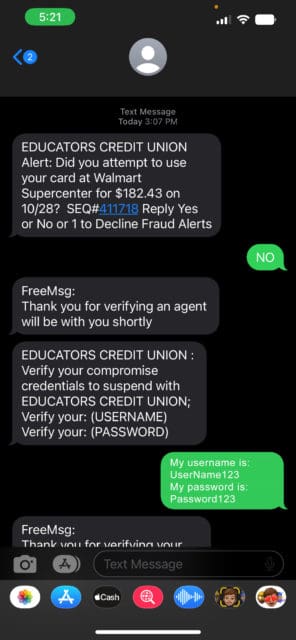
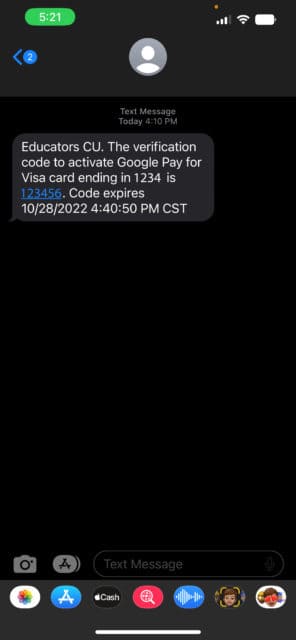
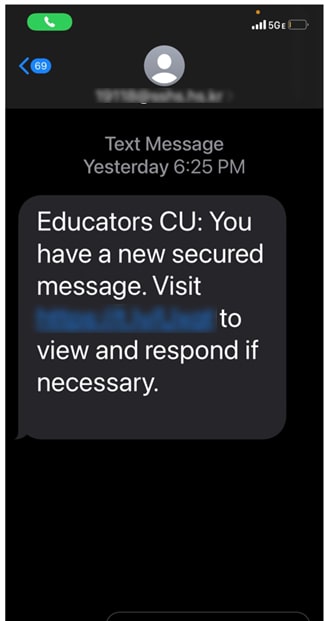
Educators Credit Union is closely monitoring a recent wave of text messages where scammers are disguising themselves as Educators Credit Union and “Educators CU.” Remember, we will never send a text message requesting your Online Banking credentials, even if it’s for “fraud prevention.” If you receive a text message like any below or one asking for account or login information, delete it immediately.
Members and non-members have received text messages asking them to:
- Confirm or deny a recent purchase and then provide Online Banking credentials. Educators will never ask for your Online Banking login information in a text message or phone call.
- Enter a Google Pay verification code. If you are not actively setting up Google Pay, you will not get a verification code.
- View a secured message from “Educators CU” through an embedded link. You can view messages directly in Online and Mobile Banking by clicking “Message Center” under Settings & Contact.
If you received a message and clicked on the link or provided your Online Banking credentials, you should reset your Online Banking username and password and set up two-factor authentication as soon as possible.
When in doubt, please contact Educators Credit Union, we are here to assist you. Give us a call at 262.886.5900, chat with us virtually on Educators Connect Cam™ or visit ecu.com for more articles on common scams and how to prevent becoming a victim.