


Invest in a Better Future with Online Stock Trading
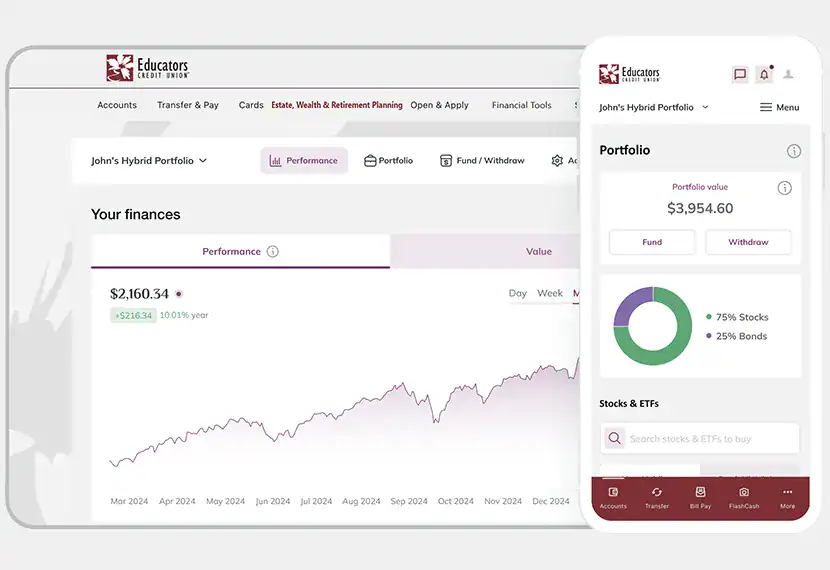
Take control of your investing with an intuitive online trading platform designed to help you research opportunities, manage your portfolio and trade stocks or ETFs with ease, all in Online & Mobile Banking.

-
Affordable
Start your journey with as little as $10.
-
All in Our App
Simplify your experience by staying within our app so there is no need to create an additional account.
-
Personalization
Tailored investment portfolios for your unique needs and risk tolerance.
Why Educators Credit Union Online Stock Trading?
Invest on Your Terms
Building wealth doesn’t have to be complicated. Whether you’re new to investing or experienced, the Online Stock Trading platform gives you flexibility and control, all built into our mobile app or digital banking experience.1, 2
Seamless Experience
- No new app to download.
- One login, use your credentials.
- Move money easily and securely between accounts.
Accessible & Affordable
- Access the platform from your online or mobile account under the Estate, Wealth, & Retirement Planning tab.
- Choose from self-directed, hybrid or pre-built portfolios tailored to your goals.3, 4
Empower Your Financial Future
- Track and manage your investments alongside your checking, savings and other Educators accounts.
- Set up recurring investments.
- Transfer a brokerage account from another provider.5
How It Works
-
Step 1: Log into Online Stock Trading
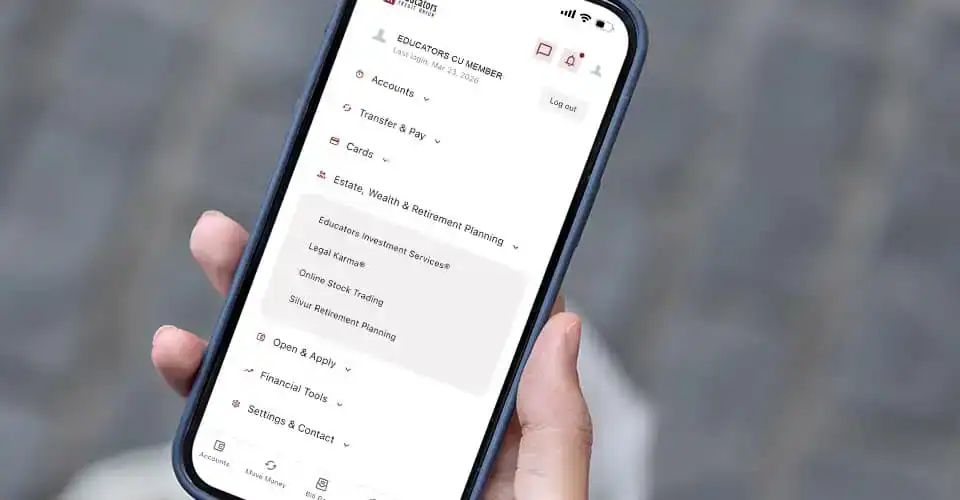
Use our Online or Mobile Banking app to access Online Stock Trading under Estate, Wealth & Retirement Planning. -
Step 2: Share Your Goals
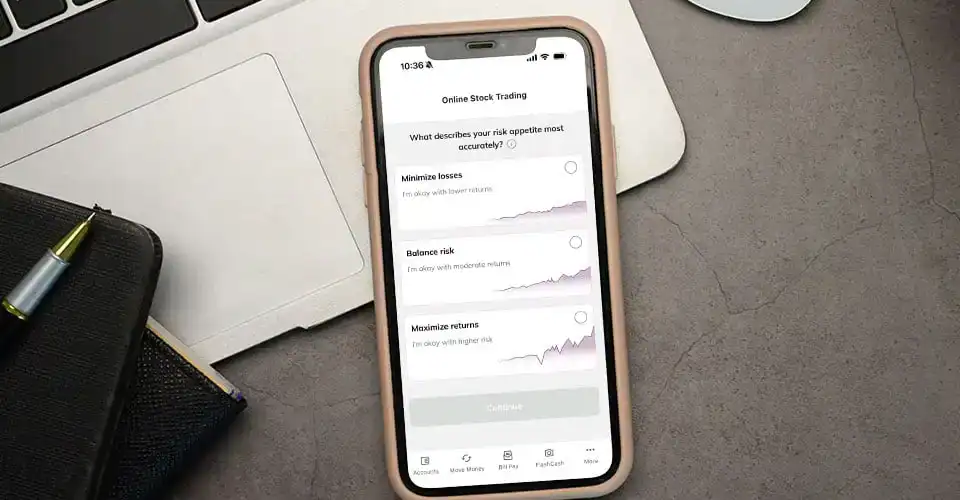
Answer a few simple questions to help personalize your investment approach that best suits your financial goals. -
Step 3: Start Investing
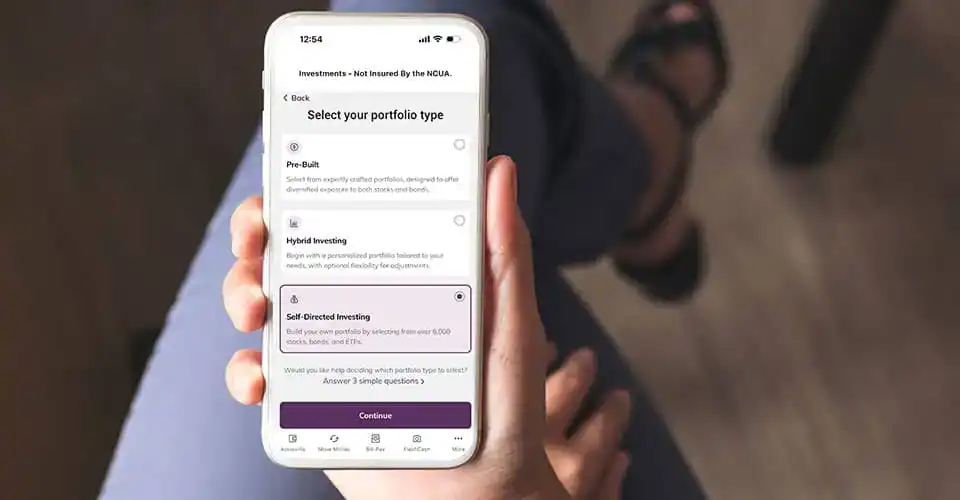
Choose from pre-built portfolios, hybrid portfolios or go self-directed and pick your own assets. Manage your investments with confidence, from buying fractional shares and ETFs to tracking performance over time.
Getting Started with Online Stock Trading FAQs
How do I start investing?
Getting started with investing is easy. Just click the ‘Online Stock Trading’ option in Online or Mobile Banking under Estate, Wealth & Retirement Planning and follow the onboarding steps.
How long does it take to open an online investment account?
Opening an account can be completed from your computer, tablet or phone, and should take no longer than 5 minutes. In some rare cases, additional data is required to approve your investment account. In those cases, account approval can take up to 2 business days after the additional data is provided.
How do I fund stock purchases?
Fund your wallet for future purchases
To fund your wallet for future trading, simply go to ‘Fund/Withdraw’ and select a funding amount. Next, choose which account you want to use for funding. This can be either an already-connected account or another account via a third-party financial institution. For funding from third-party financial institutions, we use Plaid. Funds will arrive in your wallet in approximately an hour.
Fund directly from your checking or savings during market hours
If you are ready to buy stocks now, you can transfer funds from your connected checking or savings account. Browse stocks and ETFs under the Portfolio. Please be aware that stock trading hours are from 8:30 a.m. to 3:00 p.m. Central Time, M-F except federal holidays.
How do I purchase stocks directly from a checking or savings with no wait time?
- Log in to Online or Mobile Banking, navigate to Estate, Wealth, & Retirement Planning then to Online Stock Trading
- Select your self-directed portfolio
- Locate the stock you want to purchase under the Portfolio tab
- Under the Buy With heading select the Bank Account option, choose your checking or savings account from the dropdown, enter the quantity and review order. Verify the details and click Buy
Portfolio FAQs
What is self-directed investing and are there fees?
Self-directed investing allows you to start with an empty portfolio and make your own investment decisions without advice or recommendations. Self-directed investing is commission-free. We don’t charge anything per trade or to maintain your account.
What are hybrid and pre-built portfolios and are there fees?
Hybrid and pre-built portfolios offer expert assistance for buying and selling stocks or ETFs. There are fees associated with these types of portfolios.
Can I have multiple portfolios of different types?
Yes, you can choose from pre-built portfolios, hybrid portfolios and self-directed portfolios, and can have as many portfolios as you like simultaneously.
What is the best way to transfer funds between portfolios?
The fastest way to transfer funds from one portfolio to another is by initiating a withdrawal by selecting the “transfer to portfolio” option, then selecting a destination portfolio. The process can take up to 2 days to complete.
Can I transfer an account from another brokerage?
Yes, you can transfer an account from another brokerage.
- Use the Transfer Portfolio feature inside the Online Stock Trading widget
- Click on the “Transfer Portfolio” button found under the Account tab.
- Complete the form and submit details about the source financial institution as well as a recent statement.
Transfer Details:
- We support the transfer of all whole shares from individual accounts. Any fractional shares and any unsupported securities will be liquidated and transferred as cash.
- Transfers are typically processed in 5-10 business days.
- There are no fees charged by Educators Credit Union online investments. Please consult the source financial institution, as they may charge for the transfer.
- Need help? Contact our support team at hello@eko.investments for assistance with your transfer.
Transfers from another brokerage may cause a taxable event. Please contact a tax professional.
General Online Stock Trading FAQs
What is stock investing?
Stock investing refers to buying and owning shares of a company’s stock with the expectation of generating a profit from the appreciation in stock price and through dividends.
By investing in stocks, people can become owners of companies and benefit from their success. It provides an opportunity for diversification, allowing individuals to spread their risk across different companies and industries. Stock investing has historically been a good protection against inflation.
How do I get tax or account statements for my investment account?
If you have a tax or account statement available, you can find it by clicking ‘Account’ and then ‘Documents and Statements’. From there, select the statement you’re looking for and open or download it. These tax forms may arrive separately from your other Educators Credit Union tax forms.
Can I always take my money out of my investment account?
Yes, we don’t have a minimum holding time, and you can deposit and withdraw at any time, free of charge. Withdrawals can take up to 3 business to appear back your account.
Do I need to add beneficiaries?
Yes, your beneficiaries do not carry over from Educators Credit Union account. You will need to set up beneficiaries inside of the Online Stock Trading dashboard. Find this under Account then Beneficiaries.
Disclosures
- Investments are not insured by the NCUA, are not deposits and may lose value. Must be at least 18 years old to use this service.
- Business and Fiduciary Accounts, such as Custodial, Trust, Rep-payee and Guardianships are not eligible for this service.
- No fee transactions for self-directed investing.
- Fees may apply for hybrid and pre-built portfolios.
- Transfers from another brokerage may cause a taxable event. Please contact a tax professional.